<!doctype html>
<html>
<head>
<meta http-equiv="Content-Type" content="text/html; charset=utf-8" />
<!-- Google tag (gtag.js) -->
<script async src="https://www.googletagmanager.com/gtag/js?id=G-GTPVTK30F4"></script>
<script>
  window.dataLayer = window.dataLayer || [] ;
  function gtag(){dataLayer.push(arguments) ; }
  gtag("js", new Date() );
  gtag("config", "G-GTPVTK30F4") ;
</script>
<meta http-equiv="content-language" content="ja" />
<meta name="viewport" content="width=device-width, initial-scale=1" />
<meta http-equiv="content-script-type" content="text/javascript" />
<meta http-equiv="content-style-type" content="text/css" />
<meta http-equiv="pragma" content="no-cache" />
<meta http-equiv="cache-control" content="no-cache" />
<meta http-equiv="expires" content="Sat, 01 Jan 2000 09:00:00 GMT" />
<meta name="author" content="VisWorks" />
<meta name="generator" content="CALib&reg;Mini ver1.0.0" />
<meta name="keywords" content="VisWorks,校正指示" />
<meta name="description" content="VisWorks&reg;は強力な校正指示機能を備えたオンライン校正ツールで、日常業務でファイルを扱われる方々の業務効率を高めます。" />
<link type="text/css" rel="stylesheet" href="/css/usr/default/styles-94.css" />
<link type="text/css" rel="stylesheet" href="/css/usr/default/otherstyle-94.css" />
<link type="text/css" rel="stylesheet" href="/css/usr/default/gaiyo-94.css" />
<link type="text/css" rel="stylesheet" href="/js/3rd/jquery-ui/css/jquery-ui.css" />
<script type="text/javascript" src="/js/3rd/jquery-1.9.1.js"></script>
<script type="text/javascript" src="/js/3rd/jquery-ui/js/jquery-ui.js"></script>
<script type="text/javascript" src="/js/usr/default/pagetop-94.js"></script>
<link rel="shortcut icon" href="/img/usr/default/favicon.ico" />
<!-- @SITENAME=VisWorks -->
<!-- @PAGENAME=トップページ -->
<!-- @SUBJECTS= -->
<!-- @SUBJDATE= -->
<!-- @LASTUPDT=0 -->
<title>VisWorks</title>
</head>
<body>
  <div class="container">
    <header class="header">
      <div id="HEAD"><a href="https://www.visworks.jp/" target="_self"><img src="/img/usr/default/wWS-6-NUc-3.gif" width="262" height="60"  alt="VisWorks" title="VisWorks" style="top: 0px; "  /></a><p><a href="https://www.visworks.jp/form/" class="headlink">お問合せ</a>
</p></div>
      <nav>
       <div class="xbutton">
        <input type="checkbox" id="mcheck"><label for="mcheck" class="menux"><span></span></label>
        <div id="SPMENU"></div>
       </div>
       <div id="PCMENU"></div>
      </nav>
    </header>
    <div class="wrapper">
      <div class="content">
        <div id="BODYBOX"><div id="BODY"><div><div class="bbox1"  >
<div><div class="kvoutbox"  >
<div><div class="kvbox"  >
<img src="/img/usr/default/5gM-a-MNeA-1.jpg" width="1200" height="500"  alt="キービジュアル2" title="キービジュアル2" style="top: 0px; "  /></div>
</div>
</div>
</div>
<div><div class="spkvbox"  >
<div  ><img src="/img/usr/default/c2i-q-kMjD-4.jpg" width="720" height="540"  alt="キービジュアルSP" title="キービジュアルSP" style="top: 0px; "  /></div><br />
</div>
</div>
<div><h2 class="head2" id="BID001">Visworksって？</h2>
<div class="summary_box"  >
<div class="summary_img" style="float: right ;"><img src="/img/usr/default/Kaq-O-cMfG-7.png" width="700" height="540"  alt="Visworks概要" title="Visworks概要" style="top: 0px; "  /></div>
<div><div class="summary_text"  >
<div  >
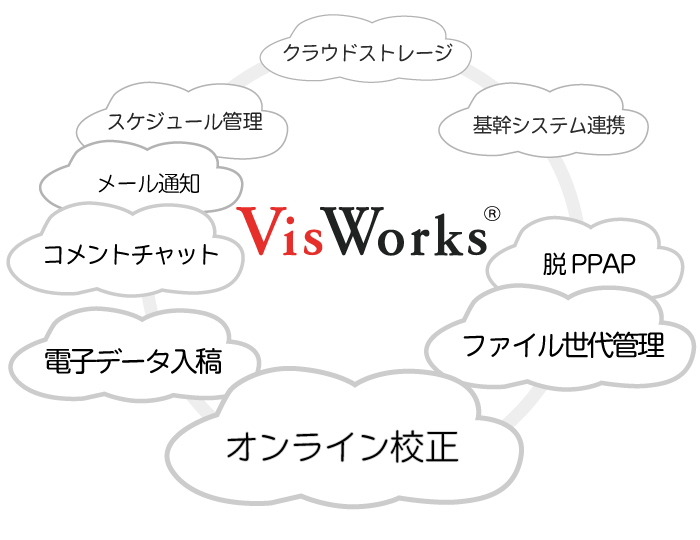
<b class="marker30">オンライン校正</b>をメインに複数のサービスを<b class="marker30">１つに集約した業務効率化サービス</b>です。
</div>
<div  >
<ul class="inul1" style="list-style-position: outside; list-style-type: disc;">
<li>チャット</li>
<li>クラウドストレージ</li>
<li>脱ＰＰＡＰ</li>
<li>スケジュール管理</li>
<li>電子入稿　</li>
</ul>
</div>
</div>
</div>
<div class="vspace01">&nbsp;</div><div class="floatclear">&nbsp;</div>
</div>
</div>
<div><h2 class="head2" id="BID002">こんなお悩みを解決</h2>
<div class="gaiyo_frame"  >
<div data-aos="">
<div class="gaiyo_box"><span class="gaiyo_title">協業ツールとして</span>
<span class="gaiyo_text">コスト面からもディスク容量を抑えたい</span><br>
<span class="gaiyo_text">チェックバック作業の効率をあげたい</span><br>
<span class="gaiyo_text">修正モレなど確認作業の効率を上げたい</span><br>
<span class="gaiyo_text">スケジュールの進捗状況を把握したい</span><br>
<span class="gaiyo_text">チームコミュニケーションを円滑にしたい</span>
</div>
</div><div data-aos="">
<div class="gaiyo_box"><span class="gaiyo_title">業務ツールとして</span>
<span class="gaiyo_text">漏洩や改ざん対策など安全面が気になる</span><br>
<span class="gaiyo_text">図面や写真などデータ入稿を受付けしたい</span><br>
<span class="gaiyo_text">スケジュールの進捗状況を把握したい</span><br>
<span class="gaiyo_text">外出先からでも同じように利用したい</span>
</div>
</div><div data-aos="">
<div class="gaiyo_box"><span class="gaiyo_title">社内業務の効率化として</span>
<span class="gaiyo_text">探す時間を減らして効率を上げたい</span><br>
<span class="gaiyo_text">先祖返りを避け最新版を見失わず共有したい</span><br>
<span class="gaiyo_text">コスト面からもディスク容量を抑えたい</span><br>
<span class="gaiyo_text">漏洩や改ざん対策など安全面が気になる</span><br>
<span class="gaiyo_text">外出先からでも同じように利用したい
</div>
</div></div>
</div>
<div><h2 class="funchead2" id="BID003">主な機能説明</h2>
<div class="bbox2each"  >
<div><h3 class="head3_thr" id="BID004">オンライン校正</h3>
<div class="func3"  >
<div><h3 class="head3" id="BID005">校正指示</h3>
<div class="frame3"  >
<div class="def_text" >
文章はもちろん、設計図面やアルバムもお絵描きツールを使用して、校正記号、矢印などの他、文章を記入する事で簡単に校正指示できるので、ダウンロードや印刷の手間もありません。
</div>
</div>
</div><div><h3 class="head3" id="BID006">同期編集</h3>
<div class="frame3"  >
<div class="def_text" >
複数人で同時に同じファイルを校正指示ツールで開く事で、リアルタイムに編集内容を共有しながらの作業が行なえるので、微妙なニュアンスも共有できます。
</div>
</div>
</div><div><h3 class="head3" id="BID007">校正確認（比較モード）</h3>
<div class="frame3"  >
<div class="def_text" >
アップロード直後の全ページを閲覧できる他、校正指示の内容確認できる画面では、過去版と並べて比較できるので、改定モレなどの見逃しも減り、作業効率がアップします。
</div>
</div>
</div>
</div>
</div>
</div>
</div>
<div><div class="bbox2fill"  >
<div><h3 class="head3_thr" id="BID008">ファイルの世代管理</h3>
<div class="func2"  >
<div><h3 class="head3" id="BID009">版管理</h3>
<div class="frame3"  >
<div class="def_text" >
版管理フォルダに設定する事で、同じ名前のファイルを識別し、当該フォルダは最新版ファイルに保たれますので、先祖返りなど不慮の事故を防げます。古い版のファイルは履歴フォルダに自動的に移動します。
</div>
</div>
</div><div><h3 class="head3" id="BID010">同名識別</h3>
<div class="frame3"  >
<div class="def_text" >
ファイルの版は、パソコンで日付を付けた名前で管理されているケースが良くあります。これらファイルの命名ルールを設定できますので、日付などがファイル名にあるファイルを同じファイルとして認識させる事ができます。
</div>
</div>
</div>
</div>
</div>
</div>
</div>
<div><div class="bbox2each"  >
<div><h3 class="head3_thr" id="BID011">イメージ(サムネイル)化</h3>
<div class="func3"  >
<div><h3 class="head3" id="BID012">全ページイメージ化</h3>
<div class="frame3"  >
<div class="def_text" >
ファイルの全ページをイメージ化する事で専用アプリを用いなくても内容の確認が行なえます。また様々な形式のファイルを同様にイメージ化する事で、お絵描きツールを用いた校正指示を可能にしています。
</div>
</div>
</div><div><h3 class="head3" id="BID013">動画ページ化</h3>
<div class="frame3"  >
<div class="def_text">
動画ファイルはデフォルトでは代表サムネイル１枚だけ作成しますが、数分毎に１ページとするなどページ化する事ができます。<br />（例：３６０フレーム毎に１ページなどカスタマイズ可能です）<br /><br /><div style="text-align: right;">オプション</div></div>
</div>
</div><div><h3 class="head3" id="BID014">ＣＡＤデータ</h3>
<div class="frame3"  >
<div class="def_text">
２Ｄ ＣＡＤファイルもオプションとなりますが、dxf、dwf の拡張子のＣＡＤデータのイメージ（サムネイル）を作成する事ができます。これにより図面や設計書の校正指示も行えます。<br /><br /><div style="text-align: right;">オプション</div></div>
</div>
</div>
</div>
</div>
</div>
</div>
<div><div class="bbox2fill"  >
<div><h3 class="head3_thr" id="BID015">コメントチャット</h3>
<div class="func3"  >
<div><h3 class="head3" id="BID016">フォルダコメント</h3>
<div class="frame3"  >
<div class="def_text" >
フォルダ単位でのコミュニケーションを行う事ができます。当該フォルダ内のファイルコメントやサブフォルダコメントを取り込んで表示する事もできますので、全体の進捗確認など俯瞰した利用に向いています。
</div>
</div>
</div><div><h3 class="head3" id="BID017">ファイルコメント</h3>
<div class="frame3"  >
<div class="def_text" >
ファイル単位でのコミュニケーションを行う事ができます。版管理フォルダでは改定前のファイルのやり取りも取り込んで表示する事ができますので、経緯を見失う事なく効率良く作業する事ができます。
</div>
</div>
</div><div><h3 class="head3" id="BID018">メンション通知（メール）</h3>
<div class="frame3"  >
<div class="def_text" >
メンション（相手を特定）してコメントを登録する事ができます。コメントチャット記入の際にメンション指定を行うと、ウェブ通知と共にメールでも通知されますので、確認モレのリスクを軽減できます。
</div>
</div>
</div>
</div>
</div>
</div>
</div>
<div><div class="bbox2each"  >
<div><h3 class="head3_thr" id="BID019">スケジュール管理</h3>
<div class="func2"  >
<div><h3 class="head3" id="BID020">スケジュール管理</h3>
<div class="frame3"  >
<div class="def_text" >
版管理フォルダのファイルは、校了予定日時を設定する事ができ、改定（新規アップロード）や校正指示などの操作が行われるとタイムチャートに自動的にイベントとして記録され、視覚的に進捗を把握できます。
</div>
</div>
</div><div><h3 class="head3" id="BID021">完了期限前通知</h3>
<div class="frame3"  >
<div class="def_text" >
校了予定日時が設定されているファイルは、予定の２４時間前と予定時刻に通知されます。通知はメールにも届くほか、ファイルコメントにも記録されますので、見逃しも軽減できます。
</div>
</div>
</div>
</div>
</div>
</div>
</div>
<div><div class="bbox2fill"  >
<div><h3 class="head3_thr" id="BID022">一般向け</h3>
<div class="func2"  >
<div><h3 class="head3" id="BID023">ZIP ダウンロード</h3>
<div class="frame3"  >
<div class="def_text" >
最近話題の脱PPAP対策機能です。一般向けにダウンロードURLとパスワードをお知らせ送付する機能がありますので、アカウントを持たないお客様に簡単にファイルをご提供する事ができます。
</div>
</div>
</div><div><h3 class="head3" id="BID024">一般⼊稿受付フォーム</h3>
<div class="frame3"  >
<div class="def_text" >
アカウントを持たない一般向けにデータ入稿フォームを簡単に作成でき、入稿通知や対応期限の自動設定も行えます。無料のファイル転送サービスを使用しないため、お客様に安心してご利用いただけます。
</div>
</div>
</div>
</div>
</div>
</div>
</div>
<div><div class="bbox2eachlast"  >
<div><h3 class="head3_thr" id="BID025">その他</h3>
<div class="func3"  >
<div><h3 class="head3" id="BID026">拡大鏡</h3>
<div class="frame3"  >
<div class="def_text" >
１ページ目限定の機能ですが、表示されているサムネイルにオンマウスする事で拡大鏡が表示されファイルの内容を確認する事ができます。類似ファイルも簡単に中身がわかるので効率良く見つける事ができます。
</div>
</div>
</div><div><h3 class="head3" id="BID027">ファイル自動削除</h3>
<div class="frame3"  >
<div class="def_text" >
削除期限を設定する場合、１日〜１２０日の猶予期限を設定でき、ファイルを自動削除する事ができますので、ストレージ容量とファイル処理周期に併せて運用周期を設計でき、経済的に運用する事ができます。
</div>
</div>
</div><div><h3 class="head3" id="BID028">会員入稿</h3>
<div class="frame3"  >
<div class="def_text" >
アカウントをお持ちの会員様は、書き込み権があるフォルダにはアップロードできますが、会員入稿専用のフォルダを作成する事で、入稿通知や対応期限の自動設定も行えますので、見逃す事もなく対応できます。
</div>
</div>
</div>
<div><h3 class="head3" id="BID029">操作権限</h3>
<div class="frame3"  >
<div class="def_text" >
フォルダに対して「読めない／読める／書ける」の３つの権限から選択するだけの簡単設定なので、設定ミスも少なくシンプルで安全です。
</div>
</div>
</div><div><h3 class="head3" id="BID030">ファイルメモ</h3>
<div class="frame3"  >
<div class="def_text" >
ファイル名だけでは識別が難しいファイルに要約としてメモを書けるので、ファイルの識別も簡単です。ファイルメモは検索対象です。
</div>
</div>
</div><div><h3 class="head3" id="BID031">画像のペースト登録</h3>
<div class="frame3"  >
<div class="def_text" >
ホームページなどの修正依頼など、コピーしたキャプチャ画像をペーストする事でもファイルとして登録できるので、指示出しも簡単です。
</div>
</div>
</div>
<div><h3 class="head3" id="BID032">階層一括ダウンロード</h3>
<div class="frame3"  >
<div class="def_text" >
カレントフォルダ以下の下階層も含めて一括ダウンロードできますので、アーカイブプロジェクトとして、まとめてダウンロード保存しておくことができます。
</div>
</div>
</div>
</div>
</div>
</div>
</div>
<div><h2 class="funchead2" id="BID033">カスタマイズ</h2>
<div class="bbox2each"  >
<div class="def_text" >
VisWorks はクラウドサービスですが、御社独自の機能拡張や基幹連携にも対応可能でカスタマイズも承ります。
</div>
<div class="def_text" >
いずれもオプションとなりますが、ご相談ください。
</div>
<div><h3 class="head3_thr" id="BID034">機能追加・変更</h3>
<div class="func2"  >
<div><h3 class="head3" id="BID035">機能変更</h3>
<div class="frame3"  >
<div class="def_text" >
拡大鏡で表示される写真をオリジナル等倍サイズで表示したい。あるいは拡大鏡はそのままで構わないが、別途オリジナル等倍写真を表示したいなど、機能の変更も承ります。
</div>
</div>
</div><div><h3 class="head3" id="BID036">機能追加</h3>
<div class="frame3"  >
<div class="def_text" >
会員入稿フォルダではなく、会員向けの注文入稿フォームを設けたい。あるいはホームページに設置されたフォームに入稿されたデータを連携したいなど、御社独自の機能の追加も承ります。
</div>
</div>
</div>
</div>
</div>
</div>
</div>
<div><div class="bbox2fill"  >
<div><h3 class="head3_thr" id="BID037">基幹連携</h3>
<div class="func3"  >
<div><h3 class="head3" id="BID038">プライベートクラウド</h3>
<div class="frame3"  >
<div class="def_text" >
基幹システム連携にあたりプライベートクラウド環境での実装など、ネットワーク設計、構築、運用まで、より安全に便利に活用していただけるお手伝いも承ります。
</div>
</div>
</div><div><h3 class="head3" id="BID039">基幹連携</h3>
<div class="frame3"  >
<div class="def_text" >
御社の基幹システムへのデータ受け渡しや、データ取得など基幹システムとの連携について、CSVファイルから API の準備、あるいは API の呼び出しなど、安全な設計から運用までサポートいたします。
</div>
</div>
</div><div><h3 class="head3" id="BID040">他社サービス連携</h3>
<div class="frame3"  >
<div class="def_text" >
入稿された情報を元に、例えば kintone のワークフローを自動登録するなど、追加の項目が無い場合は無償対応可能です。レコード追加権限があるAPIトークンをお知らせください。
</div>
</div>
</div>
</div>
</div>
</div>
</div>
<div class="bbox2" id="inqbox">
  <p>お申込み、お試し利用、説明依頼など</p>
  <a class="contact" href="https://www.visworks.jp/form/">お問合せ</a>
</div>
<div><h2 class="head2" id="BID041">補足資料</h2>
<div class="bbox2"  >
<div><div class="downloadsection"  >
<div ><div class="downloadbox"><a href="/pdf/usr/default/35s-c-aNeH-16.pdf" class="def_link" target="_blank"><img src="/img/usr/default/Jry-P-4NfC-1.gif" alt="パンフレット" class="def_img" style="float: left;" /> パンフレット</a>    <br style="clear: both;" /></div>
</div><div ><div class="downloadbox"><a href="/pdf/usr/default/Z3X-z-BNeD-16.pdf" class="def_link" target="_blank"><img src="/img/usr/default/ScO-G-KNfD-1.gif" alt="マニュアル" class="def_img" style="float: left;" /> マニュアル</a>    <br style="clear: both;" /></div>
</div>
</div>
</div>
<div><h2 class="head2_all" id="BID042">サムネイル対応ファイル種別</h2>
<div class="frame1"  >
<div class="tinytext">
<div class="tabscroll">
<table  style="border-top: 1px solid #aaaaaa ; border-left: 1px solid #aaaaaa ; " cellspacing="0" cellpadding="3" width="100%" >
<tbody>
<tr style="color: #222222;border-bottom: 1px solid #aaaaaa ; border-right: 1px solid #aaaaaa ; ">
<td  style="font-size: 16px ; line-height: 120% ; color: #222222;border-bottom: 1px solid #aaaaaa ; border-right: 1px solid #aaaaaa ; " valign="middle" align="left" colspan="3" >画像ファイル</td>
</tr>
<tr style="color: #222222;border-bottom: 1px solid #aaaaaa ; border-right: 1px solid #aaaaaa ; ">
<td  style="width: 20% ; font-size: 16px ; line-height: 120% ; color: #222222;border-bottom: 1px solid #aaaaaa ; border-right: 1px solid #aaaaaa ; " valign="middle" align="left" >　jpg/jpeg</td>
<td  style="width: 10% ; font-size: 16px ; line-height: 120% ; color: #222222;border-bottom: 1px solid #aaaaaa ; border-right: 1px solid #aaaaaa ; " valign="middle" align="center" >◯</td>
<td  style="font-size: 16px ; line-height: 120% ; color: #222222;border-bottom: 1px solid #aaaaaa ; border-right: 1px solid #aaaaaa ; " valign="middle" align="left" >Exif 情報が格納されている場合、回転位置は補正されます</td>
</tr>
<tr style="color: #222222;border-bottom: 1px solid #aaaaaa ; border-right: 1px solid #aaaaaa ; ">
<td  style="width: 20% ; font-size: 16px ; line-height: 120% ; color: #222222;border-bottom: 1px solid #aaaaaa ; border-right: 1px solid #aaaaaa ; " valign="middle" align="left" >　png</td>
<td  style="width: 10% ; font-size: 16px ; line-height: 120% ; color: #222222;border-bottom: 1px solid #aaaaaa ; border-right: 1px solid #aaaaaa ; " valign="middle" align="center" >◯</td>
<td  style="font-size: 16px ; line-height: 120% ; color: #222222;border-bottom: 1px solid #aaaaaa ; border-right: 1px solid #aaaaaa ; " valign="middle" align="left" >&nbsp;</td>
</tr>
<tr style="color: #222222;border-bottom: 1px solid #aaaaaa ; border-right: 1px solid #aaaaaa ; ">
<td  style="width: 20% ; font-size: 16px ; line-height: 120% ; color: #222222;border-bottom: 1px solid #aaaaaa ; border-right: 1px solid #aaaaaa ; " valign="middle" align="left" >　gif</td>
<td  style="width: 10% ; font-size: 16px ; line-height: 120% ; color: #222222;border-bottom: 1px solid #aaaaaa ; border-right: 1px solid #aaaaaa ; " valign="middle" align="center" >◯</td>
<td  style="font-size: 16px ; line-height: 120% ; color: #222222;border-bottom: 1px solid #aaaaaa ; border-right: 1px solid #aaaaaa ; " valign="middle" align="left" >&nbsp;</td>
</tr>
<tr style="color: #222222;border-bottom: 1px solid #aaaaaa ; border-right: 1px solid #aaaaaa ; ">
<td  style="width: 20% ; font-size: 16px ; line-height: 120% ; color: #222222;border-bottom: 1px solid #aaaaaa ; border-right: 1px solid #aaaaaa ; " valign="middle" align="left" >　bmp</td>
<td  style="width: 10% ; font-size: 16px ; line-height: 120% ; color: #222222;border-bottom: 1px solid #aaaaaa ; border-right: 1px solid #aaaaaa ; " valign="middle" align="center" >◯</td>
<td  style="font-size: 16px ; line-height: 120% ; color: #222222;border-bottom: 1px solid #aaaaaa ; border-right: 1px solid #aaaaaa ; " valign="middle" align="left" >&nbsp;</td>
</tr>
<tr style="color: #222222;border-bottom: 1px solid #aaaaaa ; border-right: 1px solid #aaaaaa ; ">
<td  style="width: 20% ; font-size: 16px ; line-height: 120% ; color: #222222;border-bottom: 1px solid #aaaaaa ; border-right: 1px solid #aaaaaa ; " valign="middle" align="left" >　tif/tiff</td>
<td  style="width: 10% ; font-size: 16px ; line-height: 120% ; color: #222222;border-bottom: 1px solid #aaaaaa ; border-right: 1px solid #aaaaaa ; " valign="middle" align="center" >◯</td>
<td  style="font-size: 16px ; line-height: 120% ; color: #222222;border-bottom: 1px solid #aaaaaa ; border-right: 1px solid #aaaaaa ; " valign="middle" align="left" >&nbsp;</td>
</tr>
<tr style="color: #222222;border-bottom: 1px solid #aaaaaa ; border-right: 1px solid #aaaaaa ; ">
<td  style="width: 20% ; font-size: 16px ; line-height: 120% ; color: #222222;border-bottom: 1px solid #aaaaaa ; border-right: 1px solid #aaaaaa ; " valign="middle" align="left" >　hiec/hief</td>
<td  style="width: 10% ; font-size: 16px ; line-height: 120% ; color: #222222;border-bottom: 1px solid #aaaaaa ; border-right: 1px solid #aaaaaa ; " valign="middle" align="center" >◯</td>
<td  style="font-size: 16px ; line-height: 120% ; color: #222222;border-bottom: 1px solid #aaaaaa ; border-right: 1px solid #aaaaaa ; " valign="middle" align="left" >Exif 情報が格納されている場合、回転位置は補正されます</td>
</tr>
<tr style="color: #222222;border-bottom: 1px solid #aaaaaa ; border-right: 1px solid #aaaaaa ; ">
<td  style="width: 20% ; font-size: 16px ; line-height: 120% ; color: #222222;border-bottom: 1px solid #aaaaaa ; border-right: 1px solid #aaaaaa ; " valign="middle" align="left" >　eps</td>
<td  style="width: 10% ; font-size: 16px ; line-height: 120% ; color: #222222;border-bottom: 1px solid #aaaaaa ; border-right: 1px solid #aaaaaa ; " valign="middle" align="center" >◯</td>
<td  style="font-size: 16px ; line-height: 120% ; color: #222222;border-bottom: 1px solid #aaaaaa ; border-right: 1px solid #aaaaaa ; " valign="middle" align="left" >&nbsp;</td>
</tr>
<tr style="color: #222222;border-bottom: 1px solid #aaaaaa ; border-right: 1px solid #aaaaaa ; ">
<td  style="font-size: 16px ; line-height: 120% ; color: #222222;border-bottom: 1px solid #aaaaaa ; border-right: 1px solid #aaaaaa ; " valign="middle" align="left" colspan="3" >文書ファイル</td>
</tr>
<tr style="color: #222222;border-bottom: 1px solid #aaaaaa ; border-right: 1px solid #aaaaaa ; ">
<td  style="width: 20% ; font-size: 16px ; line-height: 120% ; color: #222222;border-bottom: 1px solid #aaaaaa ; border-right: 1px solid #aaaaaa ; " valign="middle" align="left" >　pdf</td>
<td  style="width: 10% ; font-size: 16px ; line-height: 120% ; color: #222222;border-bottom: 1px solid #aaaaaa ; border-right: 1px solid #aaaaaa ; " valign="middle" align="center" >◎</td>
<td  style="font-size: 16px ; line-height: 120% ; color: #222222;border-bottom: 1px solid #aaaaaa ; border-right: 1px solid #aaaaaa ; " valign="middle" align="left" >&nbsp;</td>
</tr>
<tr style="color: #222222;border-bottom: 1px solid #aaaaaa ; border-right: 1px solid #aaaaaa ; ">
<td  style="width: 20% ; font-size: 16px ; line-height: 120% ; color: #222222;border-bottom: 1px solid #aaaaaa ; border-right: 1px solid #aaaaaa ; " valign="middle" align="left" >　ps</td>
<td  style="width: 10% ; font-size: 16px ; line-height: 120% ; color: #222222;border-bottom: 1px solid #aaaaaa ; border-right: 1px solid #aaaaaa ; " valign="middle" align="center" >◎</td>
<td  style="font-size: 16px ; line-height: 120% ; color: #222222;border-bottom: 1px solid #aaaaaa ; border-right: 1px solid #aaaaaa ; " valign="middle" align="left" >&nbsp;</td>
</tr>
<tr style="color: #222222;border-bottom: 1px solid #aaaaaa ; border-right: 1px solid #aaaaaa ; ">
<td  style="width: 20% ; font-size: 16px ; line-height: 120% ; color: #222222;border-bottom: 1px solid #aaaaaa ; border-right: 1px solid #aaaaaa ; " valign="middle" align="left" >　doc/docx</td>
<td  style="width: 10% ; font-size: 16px ; line-height: 120% ; color: #222222;border-bottom: 1px solid #aaaaaa ; border-right: 1px solid #aaaaaa ; " valign="middle" align="center" >◎</td>
<td  style="font-size: 14px ; line-height: 120% ; color: #222222;border-bottom: 1px solid #aaaaaa ; border-right: 1px solid #aaaaaa ; " valign="middle" align="left" >Microsoft Word ファイル</td>
</tr>
<tr style="color: #222222;border-bottom: 1px solid #aaaaaa ; border-right: 1px solid #aaaaaa ; ">
<td  style="width: 20% ; font-size: 16px ; line-height: 120% ; color: #222222;border-bottom: 1px solid #aaaaaa ; border-right: 1px solid #aaaaaa ; " valign="middle" align="left" >　xls/xlsx</td>
<td  style="width: 10% ; font-size: 16px ; line-height: 120% ; color: #222222;border-bottom: 1px solid #aaaaaa ; border-right: 1px solid #aaaaaa ; " valign="middle" align="center" >◎</td>
<td  style="font-size: 14px ; line-height: 120% ; color: #222222;border-bottom: 1px solid #aaaaaa ; border-right: 1px solid #aaaaaa ; " valign="middle" align="left" >Microsoft Excell ファイル</td>
</tr>
<tr style="color: #222222;border-bottom: 1px solid #aaaaaa ; border-right: 1px solid #aaaaaa ; ">
<td  style="width: 20% ; font-size: 16px ; line-height: 120% ; color: #222222;border-bottom: 1px solid #aaaaaa ; border-right: 1px solid #aaaaaa ; " valign="middle" align="left" >　ppt/pptx</td>
<td  style="width: 10% ; font-size: 16px ; line-height: 120% ; color: #222222;border-bottom: 1px solid #aaaaaa ; border-right: 1px solid #aaaaaa ; " valign="middle" align="center" >◎</td>
<td  style="font-size: 14px ; line-height: 120% ; color: #222222;border-bottom: 1px solid #aaaaaa ; border-right: 1px solid #aaaaaa ; " valign="middle" align="left" >Microsoft Powerpoint ファイル</td>
</tr>
<tr style="color: #222222;border-bottom: 1px solid #aaaaaa ; border-right: 1px solid #aaaaaa ; ">
<td  style="width: 20% ; font-size: 16px ; line-height: 120% ; color: #222222;border-bottom: 1px solid #aaaaaa ; border-right: 1px solid #aaaaaa ; " valign="middle" align="left" >　ai/ait</td>
<td  style="width: 10% ; font-size: 16px ; line-height: 120% ; color: #222222;border-bottom: 1px solid #aaaaaa ; border-right: 1px solid #aaaaaa ; " valign="middle" align="center" >◎</td>
<td  style="font-size: 14px ; line-height: 120% ; color: #222222;border-bottom: 1px solid #aaaaaa ; border-right: 1px solid #aaaaaa ; " valign="middle" align="left" >Adobe Illustrator ファイル</td>
</tr>
<tr style="color: #222222;border-bottom: 1px solid #aaaaaa ; border-right: 1px solid #aaaaaa ; ">
<td  style="width: 20% ; font-size: 16px ; line-height: 120% ; color: #222222;border-bottom: 1px solid #aaaaaa ; border-right: 1px solid #aaaaaa ; " valign="middle" align="left" >　psd</td>
<td  style="width: 10% ; font-size: 16px ; line-height: 120% ; color: #222222;border-bottom: 1px solid #aaaaaa ; border-right: 1px solid #aaaaaa ; " valign="middle" align="center" >◯</td>
<td  style="font-size: 14px ; line-height: 120% ; color: #222222;border-bottom: 1px solid #aaaaaa ; border-right: 1px solid #aaaaaa ; " valign="middle" align="left" >Adobe Photoshop ファイル</td>
</tr>
<tr style="color: #222222;border-bottom: 1px solid #aaaaaa ; border-right: 1px solid #aaaaaa ; ">
<td  style="width: 20% ; font-size: 16px ; line-height: 120% ; color: #222222;border-bottom: 1px solid #aaaaaa ; border-right: 1px solid #aaaaaa ; " valign="middle" align="left" >　txt</td>
<td  style="width: 10% ; font-size: 16px ; line-height: 120% ; color: #222222;border-bottom: 1px solid #aaaaaa ; border-right: 1px solid #aaaaaa ; " valign="middle" align="center" >◎</td>
<td  style="font-size: 14px ; line-height: 120% ; color: #222222;border-bottom: 1px solid #aaaaaa ; border-right: 1px solid #aaaaaa ; " valign="middle" align="left" >拡張子で特定されずテキストファイルとして識別できればサムネイが作成されます</td>
</tr>
<tr style="color: #222222;border-bottom: 1px solid #aaaaaa ; border-right: 1px solid #aaaaaa ; ">
<td  style="font-size: 16px ; line-height: 120% ; color: #222222;border-bottom: 1px solid #aaaaaa ; border-right: 1px solid #aaaaaa ; " valign="middle" align="left" colspan="3" >動画ファイル</td>
</tr>
<tr style="color: #222222;border-bottom: 1px solid #aaaaaa ; border-right: 1px solid #aaaaaa ; ">
<td  style="width: 20% ; font-size: 16px ; line-height: 120% ; color: #222222;border-bottom: 1px solid #aaaaaa ; border-right: 1px solid #aaaaaa ; " valign="middle" align="left" >　asf</td>
<td  style="width: 10% ; font-size: 16px ; line-height: 120% ; color: #222222;border-bottom: 1px solid #aaaaaa ; border-right: 1px solid #aaaaaa ; " valign="middle" align="center" >△</td>
<td  style="font-size: 16px ; line-height: 120% ; color: #222222;border-bottom: 1px solid #aaaaaa ; border-right: 1px solid #aaaaaa ; " valign="middle" align="left" >&nbsp;</td>
</tr>
<tr style="color: #222222;border-bottom: 1px solid #aaaaaa ; border-right: 1px solid #aaaaaa ; ">
<td  style="width: 20% ; font-size: 16px ; line-height: 120% ; color: #222222;border-bottom: 1px solid #aaaaaa ; border-right: 1px solid #aaaaaa ; " valign="middle" align="left" >　mov</td>
<td  style="width: 10% ; font-size: 16px ; line-height: 120% ; color: #222222;border-bottom: 1px solid #aaaaaa ; border-right: 1px solid #aaaaaa ; " valign="middle" align="center" >△</td>
<td  style="font-size: 16px ; line-height: 120% ; color: #222222;border-bottom: 1px solid #aaaaaa ; border-right: 1px solid #aaaaaa ; " valign="middle" align="left" >&nbsp;</td>
</tr>
<tr style="color: #222222;border-bottom: 1px solid #aaaaaa ; border-right: 1px solid #aaaaaa ; ">
<td  style="width: 20% ; font-size: 16px ; line-height: 120% ; color: #222222;border-bottom: 1px solid #aaaaaa ; border-right: 1px solid #aaaaaa ; " valign="middle" align="left" >　mp4</td>
<td  style="width: 10% ; font-size: 16px ; line-height: 120% ; color: #222222;border-bottom: 1px solid #aaaaaa ; border-right: 1px solid #aaaaaa ; " valign="middle" align="center" >△</td>
<td  style="font-size: 16px ; line-height: 120% ; color: #222222;border-bottom: 1px solid #aaaaaa ; border-right: 1px solid #aaaaaa ; " valign="middle" align="left" >&nbsp;</td>
</tr>
<tr style="color: #222222;border-bottom: 1px solid #aaaaaa ; border-right: 1px solid #aaaaaa ; ">
<td  style="width: 20% ; font-size: 16px ; line-height: 120% ; color: #222222;border-bottom: 1px solid #aaaaaa ; border-right: 1px solid #aaaaaa ; " valign="middle" align="left" >　wmv</td>
<td  style="width: 10% ; font-size: 16px ; line-height: 120% ; color: #222222;border-bottom: 1px solid #aaaaaa ; border-right: 1px solid #aaaaaa ; " valign="middle" align="center" >△</td>
<td  style="font-size: 16px ; line-height: 120% ; color: #222222;border-bottom: 1px solid #aaaaaa ; border-right: 1px solid #aaaaaa ; " valign="middle" align="left" >&nbsp;</td>
</tr>
<tr style="color: #222222;border-bottom: 1px solid #aaaaaa ; border-right: 1px solid #aaaaaa ; ">
<td  style="width: 20% ; font-size: 16px ; line-height: 120% ; color: #222222;border-bottom: 1px solid #aaaaaa ; border-right: 1px solid #aaaaaa ; " valign="middle" align="left" >　avi</td>
<td  style="width: 10% ; font-size: 16px ; line-height: 120% ; color: #222222;border-bottom: 1px solid #aaaaaa ; border-right: 1px solid #aaaaaa ; " valign="middle" align="center" >△</td>
<td  style="font-size: 16px ; line-height: 120% ; color: #222222;border-bottom: 1px solid #aaaaaa ; border-right: 1px solid #aaaaaa ; " valign="middle" align="left" >&nbsp;</td>
</tr>
<tr style="color: #222222;border-bottom: 1px solid #aaaaaa ; border-right: 1px solid #aaaaaa ; ">
<td  style="width: 20% ; font-size: 16px ; line-height: 120% ; color: #222222;border-bottom: 1px solid #aaaaaa ; border-right: 1px solid #aaaaaa ; " valign="middle" align="left" >　flv</td>
<td  style="width: 10% ; font-size: 16px ; line-height: 120% ; color: #222222;border-bottom: 1px solid #aaaaaa ; border-right: 1px solid #aaaaaa ; " valign="middle" align="center" >△</td>
<td  style="font-size: 16px ; line-height: 120% ; color: #222222;border-bottom: 1px solid #aaaaaa ; border-right: 1px solid #aaaaaa ; " valign="middle" align="left" >&nbsp;</td>
</tr>
<tr style="color: #222222;border-bottom: 1px solid #aaaaaa ; border-right: 1px solid #aaaaaa ; ">
<td  style="font-size: 16px ; line-height: 120% ; color: #222222;border-bottom: 1px solid #aaaaaa ; border-right: 1px solid #aaaaaa ; " valign="middle" align="left" colspan="3" >ＣＡＤファイル</td>
</tr>
<tr style="color: #222222;border-bottom: 1px solid #aaaaaa ; border-right: 1px solid #aaaaaa ; ">
<td  style="width: 20% ; font-size: 16px ; line-height: 120% ; color: #222222;border-bottom: 1px solid #aaaaaa ; border-right: 1px solid #aaaaaa ; " valign="middle" align="left" >　dxf</td>
<td  style="width: 10% ; font-size: 16px ; line-height: 120% ; color: #222222;border-bottom: 1px solid #aaaaaa ; border-right: 1px solid #aaaaaa ; " valign="middle" align="center" >※</td>
<td  style="font-size: 16px ; line-height: 120% ; color: #222222;border-bottom: 1px solid #aaaaaa ; border-right: 1px solid #aaaaaa ; " valign="middle" align="left" >&nbsp;</td>
</tr>
<tr style="color: #222222;border-bottom: 1px solid #aaaaaa ; border-right: 1px solid #aaaaaa ; ">
<td  style="width: 20% ; font-size: 16px ; line-height: 120% ; color: #222222;border-bottom: 1px solid #aaaaaa ; border-right: 1px solid #aaaaaa ; " valign="middle" align="left" >　dwf</td>
<td  style="width: 10% ; font-size: 16px ; line-height: 120% ; color: #222222;border-bottom: 1px solid #aaaaaa ; border-right: 1px solid #aaaaaa ; " valign="middle" align="center" >※</td>
<td  style="font-size: 16px ; line-height: 120% ; color: #222222;border-bottom: 1px solid #aaaaaa ; border-right: 1px solid #aaaaaa ; " valign="middle" align="left" >&nbsp;</td>
</tr>
</tbody>
</table>
</div>
<br />◯ １ページサムネイル<br />◎ 複数ページサムネイル<br />△ １ページサムネイル（複数ページサムネイル対応可）<br />※ オプションで１ページサムネイル対応可<br /><br /><ul style="list-style-position: outside; list-style-type: square;">
<li>Microsoft Word,Microsoft Excel,Microsoft Powerpoint は Microsoft 社の商標または登録商標です。</li>
<li>Adobe Illustrator, Adobe Photoshop, eps, ps および pdf は Adobe 社の商標または登録商標です。</li>
<li>kintone はサイボウズ株式会社の登録商標です。</li>
</ul>
<br /></div>
</div>
</div>
</div>
</div>
</div>
</div></div></div>
      </div>
    </div>
    <footer class="footer">
     <div class="footerbox">
 <div>
 </div>
 <div>
   <ul>
   <li><a href="https://www.visworks.jp/index.html#BID001" class="seclink">VisWorks って？</a></li>
   <li><a href="https://www.visworks.jp/index.html#BID002" class="seclink">こんなお悩みを解決</a></li>
   <li><a href="https://www.visworks.jp/index.html#BID003" class="seclink">主な機能説明</a></li>
   <li><a href="https://www.visworks.jp/index.html#BID033" class="seclink">カスタマイズ</a></li>
   <li><a href="https://www.visworks.jp/index.html#BID040" class="seclink">補足資料</a></li>
   <li><a href="https://www.visworks.jp/form/" class="seclink">お問合せ</a></li>
   </ul>
 </div>
 <div class="iso">
  <ul>
   <li><a href="https://www.mips.co.jp" target="_blank">企業情報</a></li>
   <li><a href="https://www.mips.co.jp/about/index.html#iso_an" target="_blank">セキュリティポリシー</a></li>
   </ul>
  <div class="isocert">
   <img src="https://www.mips.co.jp/img/about/iso27001.jpg">
   <div>
    <dl><dt>取得認証規格</dt><dd>JIS Q 27001:2014(ISO/IEC 27001:2013)</dd></dl>
    <dl><dt>認証取得番号</dt><dd>J0274</dd></dl>
    <dl><dt>認証登録日  </dt><dd>2008年11月17日</dd></dl>
    <dl><dt>審査登録機関</dt><dd><a href="https://armsr.co.jp/" target="_blank">エイエスアール株式会社</a></dd></dl>
   </div>
  </div>
 </div>
</div>
 <div class="copyright">
  (C)Copyright 2008-2023 MIP Co.,Ltd. Allright reserved. 
 </div><script src="/js/aos/aos.js">
<script>
AOS.init({
 easing: "ease-in-out-sine"
});
</script>
    </footer>
    <a href="#" id="page_top"><span>▲</span></a>
  </div>
</body>
</html>